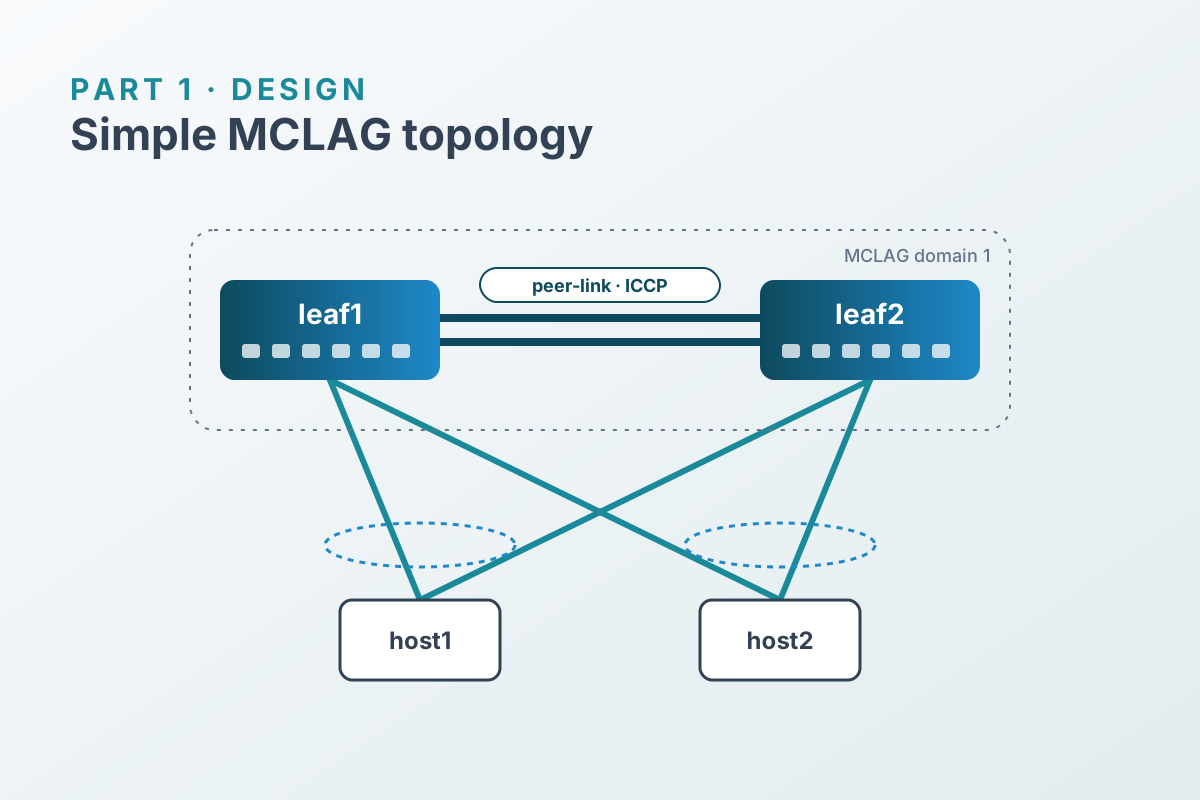

In Part 1 we designed a two-leaf MCLAG pair with dual-homed hosts. Now we build it: a Containerlab topology using SONiC virtual switches, then the MCLAG configuration, one CLI command at a time. Doing it by hand once makes the automated version much easier to reason about.
Prerequisites#
- A Linux host with Docker, Containerlab, and KVM (
/dev/kvm). On macOS, use a Linux VM with nested virtualization. - A SONiC VS image packaged with vrnetlab so it runs as the
sonic-vmkind. - The bonding kernel module on the Docker host, so the Linux hosts can build LACP bonds:
sudo modprobe bondingBuild the SONiC image#
Download a sonic-vs.img.gz from the SONiC build artifacts for the release you want. Then package it with vrnetlab. Follow the README in the sonic/ directory of the vrnetlab repo, because the exact file naming it expects can change between versions:
git clone https://github.com/srl-labs/vrnetlab.git
cd vrnetlab/sonic
# place the decompressed image here, named as the README describes, then:
make
docker images | grep sonic
Note the image tag make produced. You’ll need it in the topology file.
The topology file#
Save this as simple-mclag.clab.yml. Replace the image tag with the one you built.
name: simple-mclag

topology:
  kinds:
    sonic-vm:
      image: vrnetlab/sonic_sonic-vs:<your-tag>
  nodes:
    leaf1:
      kind: sonic-vm
    leaf2:
      kind: sonic-vm
    host1:
      kind: linux
      image: ghcr.io/hellt/network-multitool
      exec:
        - ip link add bond0 type bond mode 802.3ad lacp_rate fast
        - ip link set eth1 down
        - ip link set eth2 down
        - ip link set eth1 master bond0
        - ip link set eth2 master bond0
        - ip link set bond0 up
        - ip addr add 10.10.10.101/24 dev bond0
    host2:
      kind: linux
      image: ghcr.io/hellt/network-multitool
      exec:
        - ip link add bond0 type bond mode 802.3ad lacp_rate fast
        - ip link set eth1 down
        - ip link set eth2 down
        - ip link set eth1 master bond0
        - ip link set eth2 master bond0
        - ip link set bond0 up
        - ip addr add 10.10.10.102/24 dev bond0

  links:
    # peer-link (PortChannel0001)
    - endpoints: ["leaf1:eth1", "leaf2:eth1"]
    - endpoints: ["leaf1:eth2", "leaf2:eth2"]
    # host1 (PortChannel0002)
    - endpoints: ["leaf1:eth3", "host1:eth1"]
    - endpoints: ["leaf2:eth3", "host1:eth2"]
    # host2 (PortChannel0003)
    - endpoints: ["leaf1:eth4", "host2:eth1"]
    - endpoints: ["leaf2:eth4", "host2:eth2"]
Deploy it:
sudo containerlab deploy -t simple-mclag.clab.ymlThe SONiC VMs take a few minutes to boot. Once containerlab inspect shows them as healthy, log in with SSH (vrnetlab’s default for SONiC is admin / admin):
ssh admin@clab-simple-mclag-leaf1Interface mapping#
Containerlab’s ethN interfaces map to SONiC front-panel ports like this:
| Containerlab | SONiC |
|---|---|
eth1 | Ethernet0 |
eth2 | Ethernet4 |
eth3 | Ethernet8 |
eth4 | Ethernet12 |
Confirm the mapping on your image with show interfaces status before going further.
Clean up the factory config#
A port can’t join a port channel while it has an IP address or belongs to a VLAN. Depending on the image, the default config may contain either. Check both:
show ip interfaces
show vlan brief
Remove anything on Ethernet0–Ethernet12. For example:
sudo config interface ip remove Ethernet0 10.0.0.0/31
sudo config vlan member del 1000 Ethernet0
Then make sure the four ports are administratively up:
for p in Ethernet0 Ethernet4 Ethernet8 Ethernet12; do
  sudo config interface startup $p
done
Configure leaf1#
1. Enable the ICCP daemon#
MCLAG is implemented by the iccpd container, which is disabled on many images:
sudo config feature state iccpd enabled
show feature status iccpd
2. Port channels#
# peer-link
sudo config portchannel add PortChannel0001
sudo config portchannel member add PortChannel0001 Ethernet0
sudo config portchannel member add PortChannel0001 Ethernet4

# host-facing MCLAG members
sudo config portchannel add PortChannel0002
sudo config portchannel member add PortChannel0002 Ethernet8
sudo config portchannel add PortChannel0003
sudo config portchannel member add PortChannel0003 Ethernet12
3. VLANs#
The peer-link carries both VLANs tagged. The host port channels are untagged access ports in Vlan10.
sudo config vlan add 10
sudo config vlan add 4094

sudo config vlan member add 10 PortChannel0001
sudo config vlan member add 4094 PortChannel0001

sudo config vlan member add -u 10 PortChannel0002
sudo config vlan member add -u 10 PortChannel0003
4. The MCLAG domain#
Arguments, in order: domain ID, local (source) IP, peer IP, peer-link interface.
sudo config mclag add 1 192.168.255.1 192.168.255.2 PortChannel0001
sudo config mclag member add 1 PortChannel0002,PortChannel0003
5. The ICCP interface#
Mark Vlan4094 as a unique-IP interface, then give it its address:
sudo config mclag unique-ip add Vlan4094
sudo config interface ip add Vlan4094 192.168.255.1/30
6. Save#
sudo config save -yConfigure leaf2#
leaf2 gets the same configuration with the two ICCP addresses swapped:
sudo config feature state iccpd enabled

sudo config portchannel add PortChannel0001
sudo config portchannel member add PortChannel0001 Ethernet0
sudo config portchannel member add PortChannel0001 Ethernet4
sudo config portchannel add PortChannel0002
sudo config portchannel member add PortChannel0002 Ethernet8
sudo config portchannel add PortChannel0003
sudo config portchannel member add PortChannel0003 Ethernet12

sudo config vlan add 10
sudo config vlan add 4094
sudo config vlan member add 10 PortChannel0001
sudo config vlan member add 4094 PortChannel0001
sudo config vlan member add -u 10 PortChannel0002
sudo config vlan member add -u 10 PortChannel0003

sudo config mclag add 1 192.168.255.2 192.168.255.1 PortChannel0001
sudo config mclag member add 1 PortChannel0002,PortChannel0003

sudo config mclag unique-ip add Vlan4094
sudo config interface ip add Vlan4094 192.168.255.2/30

sudo config save -y
What ended up in CONFIG_DB#
Every config command above writes to CONFIG_DB, and config save writes it out to /etc/sonic/config_db.json. The MCLAG-specific tables on leaf1 look like this:
{
  "MCLAG_DOMAIN": {
    "1": {
      "source_ip": "192.168.255.1",
      "peer_ip": "192.168.255.2",
      "peer_link": "PortChannel0001"
    }
  },
  "MCLAG_INTERFACE": {
    "1|PortChannel0002": { "if_type": "PortChannel" },
    "1|PortChannel0003": { "if_type": "PortChannel" }
  },
  "MCLAG_UNIQUE_IP": {
    "Vlan4094": { "unique_ip": "enable" }
  }
}
That structure is exactly what we’ll template in Part 3.
Quick check#
From either leaf:
show interfaces portchannel
docker exec iccpd mclagdctl -i 1 dump state
All three port channels should be up, and the state dump should report the keepalive as OK. Then, from host1:
docker exec -it clab-simple-mclag-host1 ping -c 3 10.10.10.102If any of these checks fail, Part 4 walks through what each one is telling you.